Exciting news! The People Equation is getting some “work done.” Over the next few months, the site will undergo a transformation – with the aim of providing you access to useful and timely information to help you “master the people equation.” First up, a new “look.” Here’s the new logo: Here’s what graphic designer Lauren Mary […] Continue reading →
In February of 2015, we announced an integration with Bigcommerce, giving omnichannel merchants selling both online and offline the power to process payments through one POS system –– thereby reducing accounting inefficiencies across channels. Since then, the number one request from sellers using this integration has been real-time inventory syncing across physical and digital channels … Continue reading The post Bigcommerce and Square’s New Inventory Sync Feature: Reduce Manual Tasks and Errors When You Sell Online and Offline appeared first on The Bigcommerce Blog . Continue reading →
EDITOR’S NOTE: A few weeks ago, I asked my Facebook friends to send me a story their father liked to tell. The one that follows, submitted by the appropriately named, Michal Story, touched me deeply and reveals a common humanity we all share, even … Continue reading →
OK. I know this headline seems bold. Even presumptuous. But bear with me. I’m inspired. And even more than that — on the brink of a breakthrough. But first, some back story… Five years ago, my awesomely cool, smart, and creative daughter, Mimi … Continue reading →
Here’s a great resource I recently learned about: The Careers Network. The Careers Network has taken on the ambitious goal of cataloging all publicly offered executive development programs throughout the world. So far, they’ve amassed a list nearing 2,500. Natalie Baker, the site’s US editor-in-chief, told me that the site’s goal is to provide the […] Continue reading →
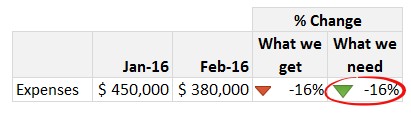
One of our readers emailed this question recently, I like the conditional formatting icons. I am trying to present some business data where going down is good. How do I get a green colored down arrow icon? Essentially, Ms. CanIGetItInGreen wants this: Unfortunately, Excel’s conditional formatting icons are not customizable. So we can’t get the green down arrows without some sneak. And sneak we shall. Continue reading →
Goal-setting in the workplace is key to getting things done. Countless studies on human motivation and performance bear this out. Yet it’s a fact that’s often lost on first-time managers. And even if they understand the importance of setting goals for team members, new leaders miss the nuances of this important management skill. I turned to […] Continue reading →
See that good looking guy to your left? That is Jesse Ditkoff, my soon-to-graduate-Hampshire-College son — a Digital Media major who will soon be launching his free lance design career. His services? Graphic design in the following arenas: webs… Continue reading →
The March Frontline Festival is up at Karin Hurt’s Let’s Grow Leaders blog. As an homage to springtime, this month’s theme is “fresh insights on leadership.” As always the topics are wide-ranging, with 22 leadership writers weighing in on: False assumptions your boss makes about your career Your audience decides if your story is believable […] Continue reading →
1. “If you can dream it, you can do it.” – Walt Disney 2. “Whatever you can do or dream you can, begin it. Boldness has genius, and magic and power in it. Begin it now.” – Goethe 3. “The greatest danger for most of us is not that our aim is too h… Continue reading →
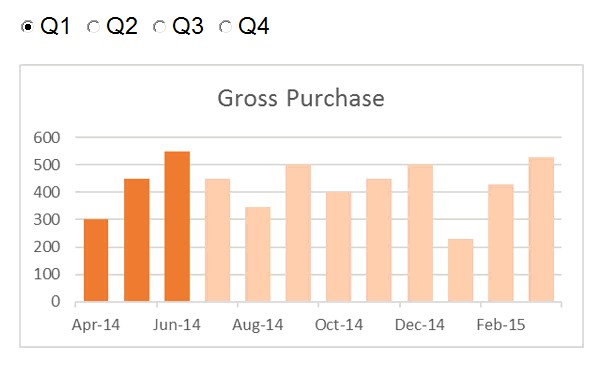
This is a guest post by Chirayu , a member of Chandoo.org forum. Animating Charts in PowerPoint cannot be done without the help of 3rd party software’s that create a flash file of the chart & embed it into the presentation. However there is a workaround for this. Save your chart as multiple images & insert them (overlapping on top of each other). Use VBA on Developer tab Controls such as Combo Box, Option Button, Check Box etc. to “Bring To Front”” the corresponding image. Thus giving the illusion of an Animated Chart in PowerPoint. This guide will teach you how to animate the charts, using the three Developer tab Controls that were mentioned before. The code & functionality only works in Slide Show Mode. File must be saved as PowerPoint Macro-Enabled Presentation (*.pptm) Continue reading →