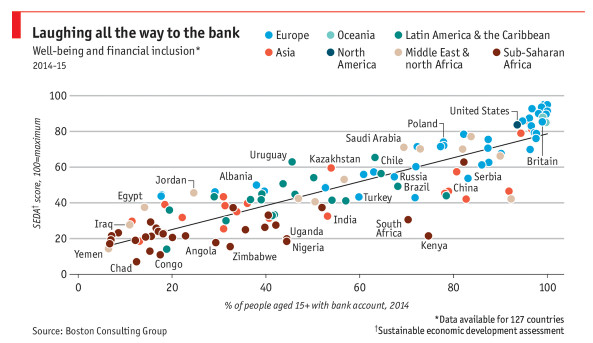
Here is a trap that is easy to fall in to. Confusing correlation as causation. As analysts, it is our job to see the data as it is rather than imply causation that doesn’t exist. Let’s sample a chart, recently featured in Economist’s graphic detail under the title Measuring well-being . Continue reading →
Stories are powerful. They open minds, shift behavior, inspire, and are remembered — unlike that last powerpoint show you saw. Stories are the simplest, fastest way to communicate meaningful messages. But you already know that. Click here for 13 v… Continue reading →
More than a year ago, Jered Goodyear was introduced to the president of a 70-year-old mattress company. The two had a mutual acquaintance, but came from vastly different backgrounds. See, Jered had spent the better part of a decade in online marketing and ecommerce strategy. He’d founded a couple of his own ventures, consulted with … Continue reading Continue reading →
Let’s say you have a date in A1 and want to find out future date after 2 years, 4 months and 9 days. Here are a few formulas you can try. =A1 + DATE(2,4,9) =EDATE(A1, 2*12+4) + 9 =A1 + 2*365 + 4*30 + 9 Surprisingly, each formula gives a different result! So which one should you use? Continue reading →
I am happy to announce the launch of my new blog: UNSPOKEN WORD: THE POETRY OF LIFE — short blasts of inspiration, reflection, and gratitude accompanied by photographs, illustrations, and paintings of my Facebook friends and other unusual suspects. … Continue reading →
Let’s kick start our Awesome August 2016 with a simple but very useful set of shortcuts. 5 shortcuts, one for each weekday. Monday ALT + M N: Open name manager. Very handy, if you have quite a few range names and want to edit / manage them. Remember, this is a sequence shortcut, that means, you press ALT M, let go of both keys and then press N. Tuesday CTRL + T: Create a new table from data in current region. For more on tables, check out our Introduction to Excel Tables page. Wednesday CTRL + W: Close the current workbook, while keeping Excel open. Thursday ALT + T O: Opens Excel options. Very easy to remember too. Friday CTRL F: Fridays can be hard to concentrate. Use CTRL+F to find what you want in the current workbook. Use CTRL+H if you wish to do a find replace. Continue reading →
Why create a culture of storytelling? Storytelling videos, interviews and articles Sparking innovation via storytelling Idea Champions Continue reading →
One of the coolest features of Excel 2016 is forecasting. Today, let’s understand how it works with a sample data set. Watch below video to understand forecasting in Excel 2016. Continue reading →
This is a wonderful movie about the Hero’s Journey — the one we are ALL on. Sets the context beautifully for the 5-day Hero’s Journey Retreat I will be co-facilitating with Dr. Beverly Nelson at the LifePath Center in San Miguel de Allende on Augus… Continue reading →
Recently, I gave a keynote presentation to 150 people in the health care industry. After being introduced, I decided, as I usually do, to leave the safe confines of the podium (“a platform raised above the surrounding level to give prominence to the person on it”), dismount the stage, and “walk my talk” – weaving my way in between the 20 tables in the room, each with their own pitchers of water, tent cards, and little bowls of mints. For a keynote speaker, however, dismounting the stage and walking into the audience, is always a risk — the same kind of risk a person takes when they decide to get married, instead of just date. Or, in even more existentially confronting terms, why it’s often easier to love humanity than just a single human being. Continue reading →