This time each year, many people peruse their industry’s conference offerings to decide which ones to attend. If you’re in the human resources, talent management, organizational development or leadership functions in your company, I suggest the WorkHuman 2017 conference. Now in its third year, the conference—sponsored by technology solutions provider Globoforce—seeks to help companies build […] Continue reading →
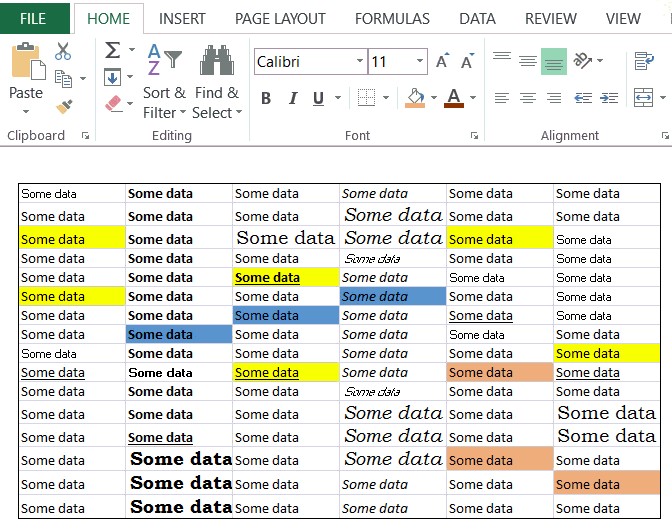
We are on a tiki tour around NZ. So far we have been to Taupo & Rotorua. And we are doing what you do when you are on a holiday – being lazy, going on walks, swimming in lakes, eating copious amounts of food and getting lost. Of course, all this means, I have very little time to access to internet & my blog. So the updates will be slow for next two weeks. Here is a quick tip (well, two of them) to keep you busy and awesome. How to remove ugly formatting from your workbooks? Do you have a colleague or boss (shudder) that loves to apply their special touches to every workbook their mouse lands on? Do you constantly wince and whine when you have to work on that spreadsheet. Here are two handy ways to restore your data to its original glory. Clear formats: Simple, select the data you want formatting gone from, go to Home > Clear > Formats. And Excel will weave an expelliformat spell at your data and make it clean. Here is a quick demo. Continue reading →
As a former political speechwriter and present day observer of the oddball dynamics accompanying the fast approaching U.S. Presidential Inauguration, I have developed an increasing respect for a man who, my fact checkers have assured me, has never wa… Continue reading →
One of the biggest egos in the cartoon world belongs to the character Plankton from the Nickelodeon cartoon SpongeBob SquarePants. Plankton’s over-inflated sense of worth (and his never-ending quest to steal the coveted Krabby Patty recipe) leads him to run roughshod over the inhabitants of Bikini Bottom. To wit: It’s funny in cartoon-land. But the […] Continue reading →
Time for some logic check. Suppose, you have three logic values in A1:C1 (TRUE or FALSE values in each cell) You need to find out if ONLY two of these values are TRUE. How would you write the formula? Got an answer? Awesome. Just post your formula in the comments. Let’s see how much variety we can get from all of our readers. Continue reading →