I’m a sponsored blog partner with Spherion (a staffing and recruiting organization) and am participating in the release of findings from Spherion’s Emerging Workforce® Study (EWS). All opinions are mine. When are employees ready to step into leadership roles? Although there is no definitive “right” answer to that question, it’s one that employers increasingly […] Continue reading →
Planning is the basis of any productivity system. Yet many people struggle with the two extremes: under- and over-planning. Today we will look at why you shouldn’t over-plan and how to make sure you are planning at the right level. The post Why You Shouldn’t Over-Plan appeared first on Simple Productivity Blog . More great content can be found on the site at Simple Productivity Blog ., or you can find me on Twitter ( @SmplProdBlog ) and Facebook ( Facebook.com/SimpleProductivity ). Continue reading →
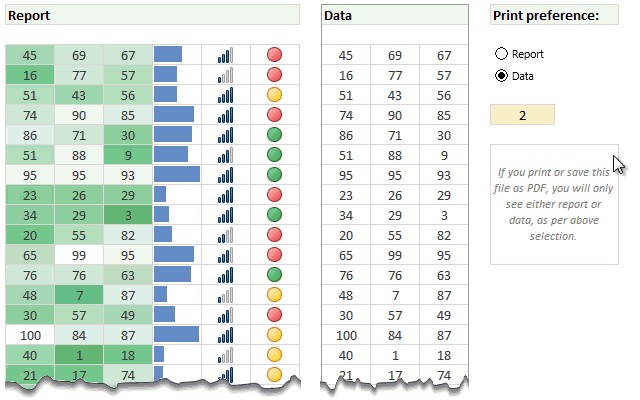
Yesterday, you learned about Print Areas – a time & paper saving feature of Excel. While print areas are great, you can only set up one print area per sheet. What if you want to print either report or data based on user selection? In such cases, you can set up dynamic print areas. That is right. See above demo to understand how it looks. Read on to learn how to set up dynamic print areas. Continue reading →
As the holiday season approaches, capturing high traffic levels and turning net new customers into proven conversions is key. What is even more important, however, for overall business growth well into 2016 is turning those new holiday shoppers into repeat purchasers through the new year. Indeed, impressing a customer at their first touchpoint with your … Continue reading The post Bigcommerce Apps and Integrations to Drive Customer Loyalty; Featuring S Loyalty, JustUno, PriceWaiter appeared first on The Bigcommerce Blog . Continue reading →
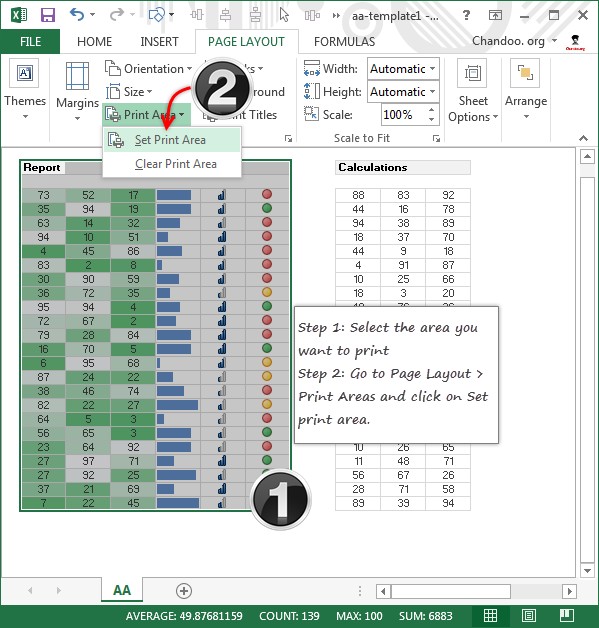
Here is a very simple but effective tip: use print areas. Oh.. but what is a print area? Imagine looking at a report or dashboard worksheet. Now, that sheet also has few calculations, some extra stuff to the right of the report. When you print, you don’t need those extra elements. Just the report will do. This […] Continue reading →
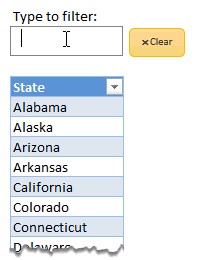
Filtering a list is a powerful & easy way to analyze data. But filtering requires a lot of clicks & typing. Wouldn’t it be cool if Excel can filter as you type, something like above. Let’s figure out how to do this using some really simple VBA code. Continue reading →
Ten years ago I was invited to teach a course on “Innovation and Business Growth” at GE’s Crotonville Management Development Center for 75 high potential, business superstars of the future. The GE executive who hired me was a very savvy guy with th… Continue reading →
The commerce world can be fickle, to say the least. In the last year alone, we’ve seen the decline of staple brands including The Gap and J.Crew, while simultaneously the rise of often lesser-praised brands including American Eagle and Wal-Mart. The secret to success for these on-the-rise retailers, though, isn’t unknown. For customer loyalty, provide … Continue reading The post Brick-and-Mortar, Mobile App Experiences Most Important for Converting Omnichannel Consumers appeared first on The Bigcommerce Blog . Continue reading →
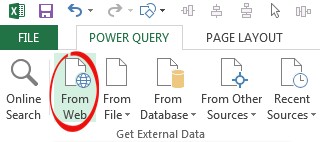
Power Query offers many ways to get data to Excel. One of them is to Web Data import feature. Let’s understand how this works by importing world stock exchange closing data from Google Finance website . [Related: Introduction to Power Query ] Continue reading →
Social media advertising is expected to explode over the course of the next three years, which is why Bigcommerce and Boostable partnered to launch an automated and optimized product ads platform for online merchants. In 2015 alone, advertising revenue from social media networks is estimated to reach $8.4 billion, and more and more marketing professionals … Continue reading The post Optimized Social Media Advertising: The Algorithmic Intelligence Powering Successful Social Sellers appeared first on The Bigcommerce Blog . Continue reading →
Here is a best practice to improve your dashboard usability. If you have an interactive dashboard, highlight user selections thru conditional formatting. Check out below quick video to understand what this means. Continue reading →