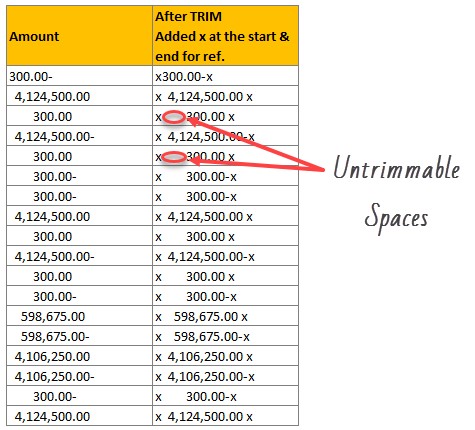
Let’s talk about the untrimmable spaces. We all know that TRIM() removes extra spaces from the beginning, ending and middle of a text. So for example, if A1 has ” something and one more ” TRIM(A1) will give “something and one more” We can use CLEAN() function to remove non-printable characters (like the ASCII codes 0 to 31). Of course, SPACE is technically a printable character, so CLEAN() won’t remove spaces. The untrimmable spaces…? The other day Sreekanth emailed me a sample of data and asked, “how do I remove the spaces in this list and convert them to numbers?” Naturally I tried to TRIM(). But the data won’t budge. See above. Hmm, let’s investigate why. Continue reading →
Brainstorming, in most companies, is broken. Or, if not broken, breaking. Or, if not breaking, highly impaired. Those of us at Idea Champions are dedicated to changing the game — and have been doing so for 25 years. Here’s a super simple way to s… Continue reading →
Brainstorming, in most companies, is broken. Or, if not broken, breaking. Or, if not breaking, highly impaired. Those of us at Idea Champions are dedicated to changing the game — and have been doing so for 25 years. Here’s a super simple way to s… Continue reading →
Every person who has ever had a job has experienced at least one “moment of truth” in their life — a time when all the chips were on the table and the decision of whether to go “all in” or not had to be made. Continue reading →